An AI chatbot trained on your own website
Give it your pages, documents and Q&A, and it answers visitors in your own words. It captures the lead, tells you what it could not answer, and hands over to a real person when the question needs one.
Trained on your content
Files, text, website pages and Q&A
Handled automatically
Escalates to your team on request
2,847
without a support ticket
What is an AI chatbot trained on your own content?
It is a chat assistant that answers from your material rather than from general internet knowledge. You hand it your pages, documents and question-and-answer pairs, it reads them, and from then on it replies using your own pricing, policies and wording.
A general-purpose chatbot cannot do this, because it has never seen your business. Bolt one onto your site and it will answer confidently and wrongly. The useful version is narrow on purpose: it knows your content, and it says so when the answer is not in there.
Read the full explainerWhat you no longer have to do
- Pick a model, or keep up with which one is best this month
- Build a retrieval pipeline over your own documents
- Host and scale an inference endpoint
- Write a chat UI, and keep it accessible on mobile
- Staff a live chat inbox for questions your docs already answer
- Guess which questions your content fails to cover
Everything that happens around the answer
Train an AI chatbot on your own website, PDFs and help docs. Add one page or crawl the whole site, retrain, and it answers from your content.
Shape the system prompt and test the answers in a private playground, so your first real visitor never meets the first draft.
Customise the chat widget with your own colours, logo and wording, and watch every change in a live preview before it goes out.
Read every chat as it happens, see which conversations turned into leads, and export any transcript when you need a record of it.
From your docs to a live chatbot, in three steps
No model to pick, no prompt engineering degree, and nothing to host.
Give it your content
Upload files, paste text, add a page or let Inletbase crawl your whole site, and add Q&A pairs for the questions you already know get asked. Click Retrain Agent and it learns from the lot.
Data sources
Status
Active
Change a source and Inletbase reminds you to retrain.
Shape it and test it
Write the instructions that set its role, tone and limits, then interrogate it in the playground until the answers are right. These chats are private, so nobody sees the rough drafts.
Instructions
Plain English. Sets the role, the tone, and what it must refuse.
Private test chat
Playground chats are private and never saved to your conversations.
Paste one script tag
Copy the embed code, drop it into your site before the closing body tag, and the chat bubble appears. Restrict it to your own domains, and switch the whole thing off any time without touching your markup.
<script
  src="https://api.inletbase.com/widget/chatbot.js"
  data-chatbot-id="YOUR_CHATBOT_ID"
  defer>
</script>
Allowed domains
List your own sites and the widget only runs there, so a copied snippet on someone else's page does nothing. Leave it empty to allow any site.
Add it to any website
One script tag is the whole install. Native plugins if you would rather not see any code at all.
WordPress
Install the plugin, pick your chatbot, and the widget appears.
GuideFramer
Connect in a few clicks, with no code and nothing to paste.
GuideAny website
One script tag before the closing body tag. That is the whole install.
GuideAllowed domains
Restrict the widget to your own sites, so a copied snippet will not run.
Guide<script
src="https://api.inletbase.com/widget/chatbot.js"
data-chatbot-id="YOUR_CHATBOT_ID"
defer>
</script>The snippet already contains your chatbot id. Switch a chatbot to disabled and the widget stops loading everywhere, without you touching the markup again.
Your documents stay your documents
Training a chatbot means handing over your internal material. That deserves a straight answer about what happens to it.
Your content is never used to train AI models
The documents and pages you upload stay yours. They are never sold, and never fed into training for anyone else. Export or delete any of it on demand.
Encrypted in transit and at rest
Stored with AES-256 at rest and carried over TLS 1.2+ in transit, on every service, including your uploaded documents.
GDPR compliant
Processed under a clear Data Processing Addendum, with right-to-erasure honoured on demand.
Allowed domains
Restrict each chatbot to your own sites, so a copied embed snippet will not run anywhere you did not approve.
Role-based access
Give each teammate only the permissions they need, with activity logs showing who changed what.
Trusted infrastructure
Runs on Amazon Web Services with Google Firebase for data and auth, processed in US regions.
Simple pricing that grows with you.
One account for all your websites. No per-form fees, no submission surcharges. Forms and chatbots included in every plan.
Starter
Perfect for individuals and hobby projects.
- 1 Form & 1 AI Chatbot
- 100 Submissions / mo
- 20 AI Credits / mo
- 1 Team Member
- AI Workflows & Automations
- AI Auto-Reply to Submissions
Pro
For growing teams that need automation.
- Unlimited Forms
- 1 AI Chatbot
- 2,000 Submissions / mo
- 1,000 AI Credits / mo
- 3 Team Members
- AI Workflows & Automations
AI chatbot questions
The things people ask before they put one on their site.
Keep reading
Articles that go deeper than this page.
AI Chatbot for Website: What It Is and How It Works
An AI chatbot for a website is a chat box placed on a site that reads a business’s own pages, prices, and documents, then answers visitor questions in real, natural language, at any hour, without a person needing to be online. In This Article What Is an AI Chatbot for a Website? An AI chatbot […]
 ZaidSep 26, 2026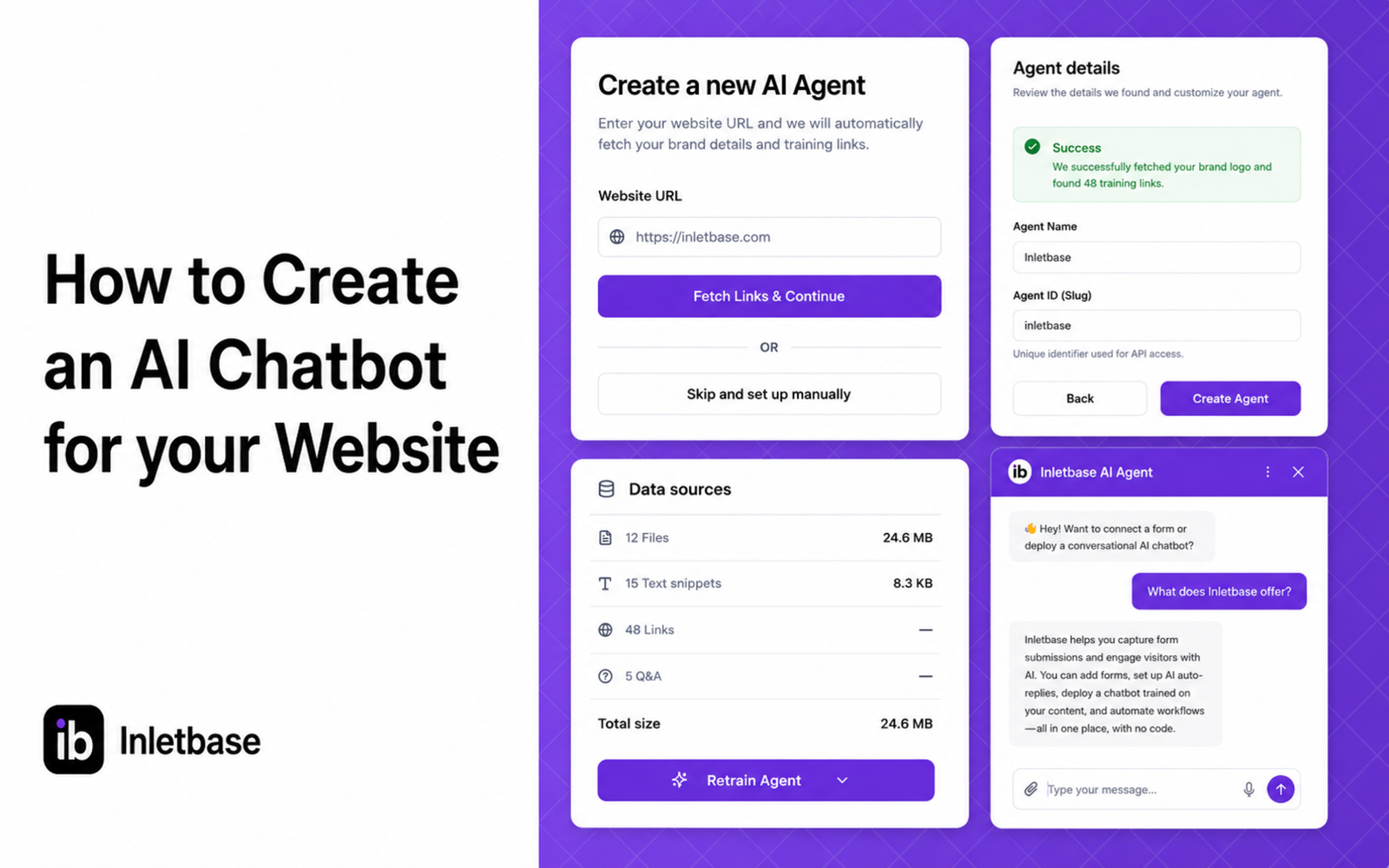
How to Create an AI Chatbot for your Website
At Inletbase, we build AI chatbots for business websites. We help people set these up every day, so this is written from what we actually see, not a guess. We keep this page updated as things change. You have seen chatbots on other websites. A little chat box in the corner that answers questions right […]
ZaidSep 2, 2026
How an AI Chatbot Trained on Your Docs Can Handle Questions Your FAQ Cannot
At Inletbase, we build AI chatbots for businesses. We see what real customers ask every day. We also see how much a normal FAQ page misses. This is written from what we see, not a guess. You already have an FAQ page. Maybe ten questions. Maybe twenty. Shipping, returns, price, hours. It took time to […]
ZaidAug 30, 2026